

UP Mini 3D Printer Review
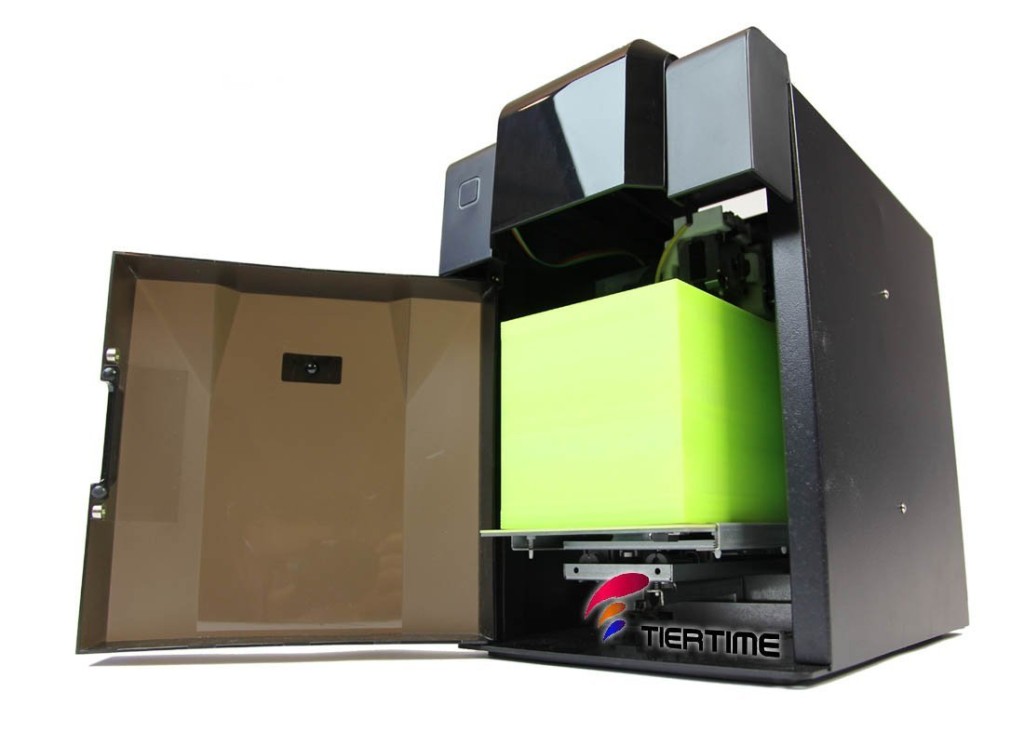
%
# Positive Reviews
Works great out of the box!
In short–great for beginners and more advanced users. Looks great next to my desk at work, unlike the DIY printers which end up looking like erector sets. Don’t let the proprietary filament issues scare you since there’s solutions already for that.
Billy EmmonsUp Mini 3D Printer Overview
The UP! Mini 3D Printer has an all-metal enclosure and fabricates objects using 1.75 mm ABS (acrylonitrile butadiene styrene) or PLA (polylactic acid) thermoplastic filament (sold separately), with a vertical resolution from 200 to 400 microns (0.20 to 0.40 mm). The UP! Mini 3D Desktop Printer can build objects to maximum dimensions of 4.75 x 4.75 x 4.75 inches/120 x 120 x 120 mm (H x W x D). The included printer management software runs on a Windows or Mac OS X computer, reads Standard Tessellation Language (STL) files generated by computer-aided design (CAD) software (sold separately) and commands the UP! Mini 3D Desktop Printer through the provided USB cable. The enclosure on the UP Mini guards against room drafts to help minimize temperature fluctuation, and helps reduce operational noise and odor. A build platform heats to 51.4 degrees C to help provide thermal stability. A perforated cell board is held to the platform by full-side mounting channels for a secure fabrication base. Solid metal guide rails and precision slide bearings help ensure precise movement. The belt-driven stepper motors meet the National Electrical Manufacturers Association (NEMA) standard ICS 16-2001.
View more 3d printer reviews here.
Low Cost & Free Shipping
Up! Mini 3D Printer Specs, Features and Q&A
- Technology: FFF (Fused Filament Fabrication)
- Maximum Build Volume (WxHxD): 7.8 x 7.8 x 7.8 inch (20x20x20cm)
- Printing Mode: Fine (100 microns), Standard (200 microns), Speed (300 microns), Ultra Fast (400 microns)
- Print Head: Single Nozzle
- Nozzle Diameter: 0.4mm
- Print Speed: 150mm/sec
- Filament Diameter: 1.75mm
- Print Material: ABS Available Now. PLA (Will be available in Q4 2014)
- File Type: .STL & XYZ Format
- Panel Type: 4 x16 LCM
- Language: English & Japanese
- Connectivity: USB 2.0 Wire
- OS Support: Windows XP (.net 4.0 required) / Windows 7 or above (for PC); Mac OSx 10.8 / 64-bit above (for Mac)
- Hardware Requirements: X86 32/64-bit compatible PCs with 2GB+ DRAM (for PC); X86 64-bit compatible Macs with 2GB+ DRAM (for Mac)
- * Product features and specifications are subject to change without notice.
- CES 2014 Editors’ Choice Award – Most Affordable 3D Printer.
- Build volume 7.8 x 7.8 x 7.8 inch, which is 15 to 75% larger than what others in its class can print
- Plug-and-Play Printer. With easy-to-install filament cartridges users can easily refill the printer.
- Da Vinci’s all enclosed design protects users from the high temperatures required to print.
- Smart Platform Auto Calibration. XYZWare EZ Mode making it easy to use for non-experienced users.
- 3D Design+ Cloud – A service platform makes your 3D creative come true.
- Less than $500 – da Vinci is the most affordable 3D printer of its capacity on the marker.
Can we use regular spools on the UP Mini or do we need to buy your cartridge?
My understanding is that the cartridges are chipped and thus are proprietary.
UPDATE: yes, there is a chip. The standard cartridge is loaded with at least 600 grams of material. I do have a new cartridge now but not yet the printer. However, I believe the chip will keep track of filament used and expire when 600g is consumed – whether or not it comes from the cartridge. The approach shown here: this 3DPrintingIndustry article merely bypasses the cartridge filament, but doesn’t change the chip’s restrictions as that is all in software
Is the UP Mini easy to use?
Once you get familiar with the UP Mini and understand the process, users report that it is pretty easy to use. It is reported that the manual is not the absolute easiest to understand as it may not have been written by a native English speaker. People who have had any issues with the UP Mini state that their support is high-quality and responsible.
Does your computer need to be connected to the UP Mini at all times when it is printing?
While your computer does need to be connected to the printer when sending the file to print, once it is printing you are free to disconnect. Users report that when you disconnect from the computer, you printer doesn’t even notice or skip a beat.
Does the UP 3d mini printer come with software that you can use to design your own 3d prints?
Once you have your printer, you can visit the company website to download the software. You are free to use any free 3d modeling software to create your own 3d prints. Two examples you can use are Google SketchUp, Wings 3D and Eureka 3D. You can also download files from www.thingverse.com where there are over 200,000 objects a available for print.
Can the printer print in many colors?
In short, there is only one print head so only one filament can be used at a time. However, one pro is that you can pause your printer mid-print to change the filament if you have a project that needs to print colors in layers. If you have a complex printing project with complex color usage, this may not be the best printer for the job. You may want something like the Makergear M2 instead.
How does the Up Mini 3D Printer compare to say the Makerbot?
While the Makerbot is a very high quality printer, some are not a fan of the price tag that comes with such quality and want a less-expensive alternative. In comparison to the Makerbot, the build area is quite a bit smaller (hence the name MINI!). Some also report that the print head has a tendancy to clog where the Makerbot does not. The Up Mini 3D printer may be great for those that want more of an introductory printer before splurging on something like a Makerbot or Makerger M2. A Flashforge Creator Pro may be a good “inbetween” printer if you want both lower cost and higher quality. With that said, there are many happy purchasers of the UP! Mini, just be aware of the pros and cons as you will have with any printer.
