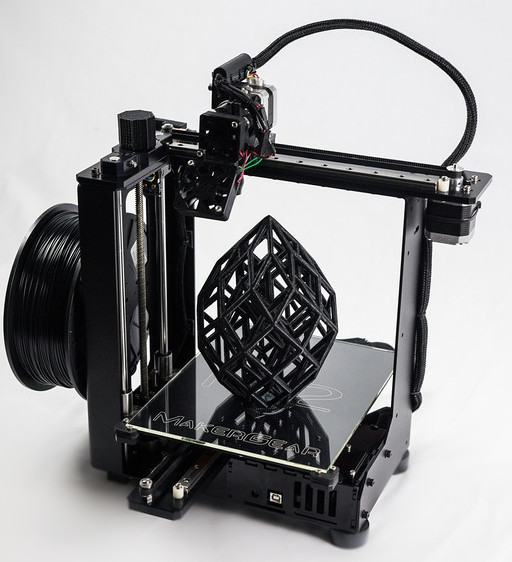
In summary for our MakerGear M2 3D printer review, is the low maintenance 3rd generation 3D printer. It’s better parts make better 3D printers.
Features:
- Large 8″ x 10″ x 8″ Build Envelope
- Work Out-Of-The-Box With ABS & PLA
- True High-Quality Linear Motion Components
- CNC Machined Precision Hardware On A Rigid Fabricated Steel Frame
- Open Design. No Proprietary Filament Cartridges
Paper is really thin but on an M2 printer you can print layers even thinner than a single sheet of paper. A printer with a flimsy frame or low tolerance parts will frequently get out of alignment and require near constant tweaking to produce quality prints. A linear rail consists of a precision machined stainless steel rail that is fastened to the aluminum plate. The printer carriage contains circulating ball bearings designed for reliable, low-maintenance and accurate linear motion. 8-inches by 10-inches by 8-inches build area.
Package Contains:
Makergear M2 Bullet Points
Very Low Maintenance
- Black Powder Coated Steel Frame with minimal plastic parts
- CNC Machined Black Anodized-Aluminum Axis Mounts
- Precision, high strength, X and Y linear rails
- Precision ground and polished stainless steel shafts
- Sturdy and proven aluminum build plate
- Circulating ball bearings provide accurate motion AND low maintenance operation
- Durable Platform heater included (no monkeying around to get a heated platform)
Fast & Precise
- User selectable Z (layer) precision down to 0.0025 millimeters (recommended at 0.1-0.25mm)
- Print speeds avg 80-200mm/second. Quality and complexity will determine speed, but still very quick.
- Nozzle size 0.35mm produces crisp detail
- Heated build plate means projects stay in place and allows for faster print speeds
- Rigid steel frame and solid components mean more precise prints and allow for faster print speeds with less errors
Strong Points
- Excellent customer reviews (worth a lot in this industry!)
- Large build area (8 x 10 x 8 inches)
- Very Quiet Operation
- Open source filament
- Works with Multiple Software
- Very low maintenance
- Dual filament (not extruder) works with PLA and ABS
- Solid Metal Frame & Stainless Steel Shafts
- Prints from SD Card and USB Cable
Specs & Features
Description & Improvements
The M Series 3D Printer family is currently on the second iteration the M2. This second generation 3D printer has many, many top of the line, user pleasing features that will make for years of happy building. The company believes that a strong and rigid printer provides the necessary foundation for quality 3D printing and have built this printer to be overly strong leaving no chance for issues related to strength. The only hard thing to do with this printer is to actually find one in stock! If this is on your wish list, you’ll want to get it as soon as you find one as stock usually depletes quickly and wait times for the M2 can exceed two weeks.
Key features and improvements:
- Steel, steel and more steel! Steel frame, stainless steel shafts and aluminum axis mounts make this one sturdy printer!
- Aluminum heated (heater included) build plate is solid and resilient. Won’t warp or bend.
- Large 8 x 10 x 8 build area
- Made in the USA!
- Dual material works with ABS and PLA
- Open Source Filament
- VERY high precision 0.0025mm layer resolution capable
- Fast! 80-200mm/sec print speeds depending on project and material
- Open source software
Package Contents
Box contents:
- M2 3D Printer
- Welcome Package
- Tools Package
- Spool Holder with Screws
- Power Supplies, Cords and USB cable
- Spool of PLA Filament
- Printed Parts Package and Sample Prints (assembled unit only)
- Hardware Package
- Miscellaneous Package
- Simplify3d 30 day trial software
- 6 Month Warranty
Specs
Dimensions
- Overall dimensions: 22 x 19 x 20 inches
- Weight: 36.6 lbs
Software:
- Open source & Simplify3D
- Compatibility: Windows, Mac OSX and, Linux
- Print over USB and SD Card (included)
- Input file type: gcode (you can import STL files into slicer and output as gcode)
Printing
- Build envelope: 8 x 10 x 8 inches
- Build volume: 640 cubic inches
- Layer thickness: 0.0025 capable (0.1-0.25mm recommended)
- Nozzle diameter: 0.35 mm (output about 0.43 mm)
- Speed: 80-200mm/sec depending on resolution and material (adjustable)
- Heated aluminum build plate
- Steel frame, stainless steel shafts and aluminum axis mounts
Materials
- Works well with QUALITY 1.75 mm ABS & PLA
M2 Video Review
Makergear M2 3D Printer Review
Noise
As you’ll see in the videos included in this review this printer is operates at a very comfortable noise level so on those long build projects you won’t have to run from your printer or deal with annoying screeches. These components are high quality throughout and this shows in the low operating noise. No users have complained that noise is unacceptable or bothersome.
Price
At around $1775 The MakerGear M2 3D Printer is a slightly higher than some other well rated and reviewed 3D printers, but one simply cannot ignore the positive feedback it has been getting for over a year now. Quality construction, reliable operation and dozens of positive reviews make the slightly higher investment easy to justify. One reviewer commented, “Just buy it!”
Setup
Setup is quick and easy with this printer. You’ll need to download some drivers from the company website which is simple and we’ve provided a quick video in the video gallery below walking you through this process. It comes boxed up pre-assembled and only a few parts need to be attached and the filament started into the extruder. Once you’re set up you can printer right away!
Setup Tips
- Get the bed level and head adjustments (z stop) right the first time to ensure high quality prints from the get go. We’ve provided Makergears video on bed leveling and head adjustment in the video gallery.
- Belt tension on the X and Y axis are critical to get the highest resolution prints
- Use the Message Board to get community support and get started quickly.
- Check out Thingiverse for free models you can use to do test prints and have fun right away with your new 3D printer
- Stick with quality filament (especially PLA) as this will make a huge difference in build quality
- Some say using two coats of Aquanet hairspray on the build bed works better than painters tape and Kapton tape. Beware this may cause build up that is difficult to remove, but may be needed if you are struggling with other options.
- Because the machine is a bit heavier than most it is not as portable and it is powerful enough that it needs to be placed on a sturdy work surface, not just a table or bench. The extruder head motions can be abrupt and if not stable can affect print quality.
- For absolute best experience users recommend the Simplify Creator software as it generates removable supports so larger and taller projects don’t succumb to sagging and drooping.
- Hot end (extruder) and bed temps should be set higher than the defaults for PLA (220c for extruder and 90c for bed)
- Remember 3D printing is a young industry and though this is a great printer it will have its quirks and issues. Rely on Makergear support, the community and a little patience to get the best experience from your printer.
Software
The Makergear in the past came bundled with open-source software and it is the consensus among owners this never was a good idea. They all agree that having such a beautiful and powerful printer with less than professional software just doesn’t do the printer justice. This will mean another investment of ~$130 to get the full version of Simplify3D (it comes bundled with a 30day free trial) to get the most from your printer. Several users report using S3D and slicer and just can’t seem to match the user friendly and consistent build quality of Simplify3D. Of course if you want to stick with the open-source options this is still a fantastic printer! Prints can be sent to the printer from an SD card (included) or USB Cable
Customer Satisfaction
If this doesn’t seal the deal for you what will? 97% of users report a 5 star rating. Not just for the printer itself, but the software, support, build quality, community and the entire 3D printing experience. At the end of the day this printer leaves people smiling. Of course you have to have realistic expectations and as one user put it, “If you want a printer that won’t cause hair loss…”, then this printer is a winner. Even at a slightly higher price point, this printer is well within the budget of a sincere hobbyist, educator or school and most certainly a business who stands to profit from ownership.
MakerGear M2 Video Gallery
Customer Testimonials
It’s what I hoped 3D printing would be! Read some reviews on the The MakerGear M2 3D Printer so I bought one. It printed beautifully right out of the box and it’s what I hoped 3D printing would be. I regularly see prints from a Makerbot Replicator 2 and my prints look as good or better and costs much less.
A fantastic 3D Printer from a superlative company! – R. Timothy Edwards
This is the one to buy! – Ellen Entwistle
Up and running in the time it takes to finish the included butterscotch pop. Literally! – Matt


Leave a Reply